Important — please update now
eCHIS HEW Application (Agrarian)
| Version | 7983 |
| Release date | Aug 24, 2026 |
| App type | Agrarian (Linked) |
 Download
 Download CCZ: Download eCHIS HEW Application v7983 (.ccz)
 Forced update is ON for this release
This version has Force Update turned on. When a health worker opens the eCHIS App and logs in, it will automatically prompt them to update to the latest version before they can continue working. Please go ahead and update when you see the prompt.
📥 Release notes (tap to expand)
1. Maternal and Child Health Enhancements
Child Vaccination and Nutrition Improvements
- Fixed child vaccination follow-up issues, including cases where children remained on follow-up lists after completing Measles 2.
- Resolved issues affecting Rota3 administration and vaccination follow-up status.
- HEWs can now schedule the next appointment when updating a child’s vaccination history.
- Added immunization reports and trends charts for delayed and zero-dose children. (zero-dose = children who have received no vaccine)
- Corrected EPI report total calculations. (EPI = routine immunization)
- Improved Vitamin A and deworming dose interval logic. (so a past dose can be recorded and the spacing between doses is calculated correctly)
- Resolved errors affecting Child Nutrition and PLW Nutrition services. (PLW = pregnant & lactating women)
- Fixed issues affecting approval of Child Nutrition action cards. (action card = the task/referral note passed between health workers)
- Incorporated Rota3 and HepB Birth Dose on Child Vaccination.
- Enhanced Growth Monitoring and Promotion (GMP) functionality by adding Length-for-Age measurements, saving Length-for-Age data to cases, creating the required reporting table, and developing the Length-for-Age chart.
- Improved GMP charts and user interface, including fixes to chart display and related calculation errors.
- Reintroduced GMP information in the All Clients and Child Nutrition sections.
- Added missing indicators for children addressed through Root Cause Analysis (RCA), including Underweight addressed with RCA and Stunted addressed with RCA. (RCA = the step where the health worker looks into why a child is underweight or stunted)
- Fixed Root Cause Analysis display logic. (the RCA information now shows correctly)
Postpartum and Family Planning Improvements
- Improved postpartum case closure to ensure clients beyond the appropriate postpartum period are no longer incorrectly displayed on active pregnancy or postpartum lists.
- Corrected duplicate and missing Family Planning reporting case generation. (so each client is counted once per year, and long-acting clients are counted each year on follow-up - instead of being double-counted or missed)
- Fixed an issue where the mother_of_child value was not being saved to client cases. (i.e. the link between a newborn and its mother was not being saved)
- Fixed the Smart Start end-of-form link to correctly restore the Family Planning Visit workflow. (finishing Smart Start now returns the user to the Family Planning visit as intended)
Disease and Service Module Improvements
- Fixed an issue where the Malaria Screening Visit form was not visible.
- Added Outreach Session Planning and Outreach Service forms.
- Updated workflow visibility logic across RMNCH, Nutrition, iCCM/CBNC, TB, Leprosy, NTD, NCD, and HIV modules to correctly reflect workflow settings. (these service modules now show or hide correctly according to their settings, so needed modules aren’t accidentally hidden)
2. Data Access and User Management
Improved Application Access and Case Management
- Updated WDU (Women Development Unit) groups to support regional structures requiring a 1–10 and 1–30 network setup. (WDU = the household groups health workers organise clients into; now supports 1-to-10 and 1-to-30 group setups)
- Updated eCHIS modules to be visible by default, improving user access and discoverability.
- Modified the All Clients case list as part of the biometric identity integration improvements. (part of adding fingerprint-based client identification)
- Added required extras and callout support for biometric integration. (the app can now launch the biometric fingerprint scan)
- Added GPS functionality to Smart Start.
User and System Access Improvements
- Fixed login and authentication issues affecting users and initial application setup.
- Addressed application access issues affecting Amhara users and staging/training environments.
- Investigated and resolved case-closing and application download issues in staging and training environments.
- Supported provisioning of CommCare dashboard access for regional users.
- Updated the application configuration to use UCR version 2.0. (behind-the-scenes reporting-engine update)
- Modified the CommCare version to 2.47.1. (behind-the-scenes platform update)
- Improved biometric integration and resolved identified integration issues. (fingerprint-based identity system)
3. Bug Fixes and Application Stability
General Application Fixes
- Resolved household registration and household editing errors.
- Fixed errors in the All Clients form/ Resolved an issue where the All Clients screen failed to open. (caused by a few records holding an invalid date)
- Resolved household relocation issues.
- Corrected misleading labels in the Disease Registration module. (the “Repeat” label, which could be read as a confirmed repeat case before it actually was)
- Resolved issues related to ANC1 action cards and referral feedback.
- Addressed application update and deployment issues reported by regional users.
- Fixed multimedia-related errors. (image/audio errors)
- Fixed fixture errors identified during testing. (fixture = reference data the app loads at startup)
Performance Improvements
- Optimized the Household Edit form to improve performance.
Application Stability and Testing Fixes
- Completed fixes identified through end-to-end testing in preparation for a stable release.
- Corrected workflow display-condition logic across affected service modules. (the rules that decide which forms/menus appear were corrected)
- Resolved identified application errors and finalized stability improvements for release.
4. DHIS2, MFS, and Reporting Improvements
(MFS = the manual report-entry screens health workers use to type in numbers the app doesn’t collect automatically. Most items here are behind-the-scenes reporting fixes that make the numbers more accurate.)
DHIS2 Interoperability and HMIS Reporting
- Conducted comprehensive HMIS API accuracy reviews across RMH, Nutrition, NTD, NCD, Neonatal, Medical, Malaria, EPI, Annual, and Quarterly reporting.
- Investigated and resolved issues causing zero-value indicators to be pushed to DHIS2. (indicators wrongly showing zero even though data was entered)
- Improved the performance of the eCHIS API used for DHIS2 web report date filtering. (the report date filter now loads far faster)
- Investigated and resolved reporting and application issues identified during Health Center pilot activities.
- Fixed DHIS2 MFS Monthly Indicator issues.
- Corrected HMIS report descriptions and removed incorrect and duplicate indicators.
- Corrected HMIS report labels, including TB indicator labels.
- Updated the report period list to display Total first.
- Modified the report puller and report pull configuration to resolve synchronization issues. (behind-the-scenes report syncing)
- Fixed report pull filtering issues.
MFS Reporting Improvements
- Redesigned the MFS mobile user interface based on user and team feedback. (simpler, easier-to-fill screens)
- Updated indicator placement between Monthly, Quarterly, and Annual reporting periods.
- Fixed MFS forms that failed to open after application updates.
- Resolved MFS monthly computation failures caused by database field limitations.
- Improved MFS submission, validation, and reporting functionality.
- Restored and optimized MFS and HMIS report filter dropdowns through database improvements, indexing, and data backfilling.
- Fixed MFS report period issues affecting Quarterly and Annual report saving.
- Updated the Annual report form label and fixed duplicate report creation.
- Fixed an issue where MFS Monthly Registration did not correctly filter out Annual and Quarterly indicators.
- Completed MFS report modifications and redesign migration to improve reporting usability and functionality.
Population and Phone Data Reporting
- Updated the phone data report so that the total population count is calculated as the sum of male and female populations.
5. Location and Organizational Structure Improvements
- Corrected organizational structure issues across multiple regions and administrative areas.
- Addressed issues related to merged, split, removed, duplicated, and newly created organizational units.
- Performed supporting location data cleanup to improve consistency across the eCHIS system.
6. Reporting Platform Enhancements
Reporting Infrastructure
- Continued development and improvement of eCHIS reporting functionality.
- Tested and reviewed the eCHIS report builder and reporting data flow.
- Resolved reporting and data consistency issues.
- Added immunization reporting functionality to support monitoring of vaccination performance, including delayed and zero-dose trends.
- Improved reporting calculations, filters, period ordering, and synchronization processes.
7. Report Accuracy and Data Quality Improvements
- Conducted RMH, EPI, and Nutrition data audits in pilot implementation areas.
- Verified the accuracy of synchronized eCHIS data in system reports.
- Investigated and resolved data consistency issues identified during reporting reviews.
- Corrected report calculations and indicator configurations affecting EPI, HMIS, MFS, and population reporting.
8. Release Management and System Maintenance
- Addressed application update issues reported during regional implementation.
- Supported system maintenance activities to improve overall application reliability and continuity of service.
- Updated application builds and configurations to support UCR V2 migration, biometric integration, mRDT implementation readiness, and stable release preparation. (mRDT = malaria rapid diagnostic test)
- Completed fixes and refinements identified during end-to-end testing to prepare the application for a stable version release.
📋 How to update (tap to expand)
Option 1 — Online (recommended)
- Open the eCHIS App and log in.
- Tap the three dots ⋮ in the top-right corner and choose Update App. The app searches for the newest version.
- When the download finishes, tap the green Update button.
- Wait for “App update was successful”, then log back in.
Because Force Update is on, the eCHIS App prompts you to update automatically at login — just tap Update.
Option 2 — Offline (using the attached CCZ)
Use this if you have no or poor internet.
- Download the CCZ file attached to this post onto the phone (or copy it from a computer to the phone’s internal storage / SD card).
- Open the eCHIS App, tap the three dots ⋮ → Update App. With no connection you will see “No network connectivity.”
- Tap the three dots ⋮ again → Offline Update.
- Select the downloaded .ccz file, then tap Update App to install.
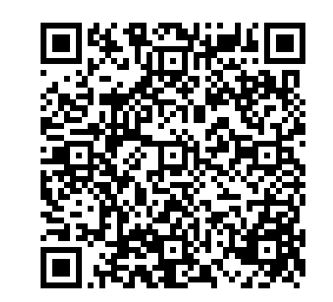
Option 3 — Install via barcode (fresh install)
Use this to install the eCHIS App on a new phone.
- Open the eCHIS App on the phone and tap Scan Application Barcode.
- Point the camera at the barcode above (expand the “Install barcode” section) and scan it.
- Tap Begin Install and wait for the installation to finish (it may take a few minutes).
- Log in with your eCHIS username and password.
 Resources & support
- Report an issue: post any problem in eCHIS Data and App Error Topics
- Training materials: eCHIS Training Materials available for download